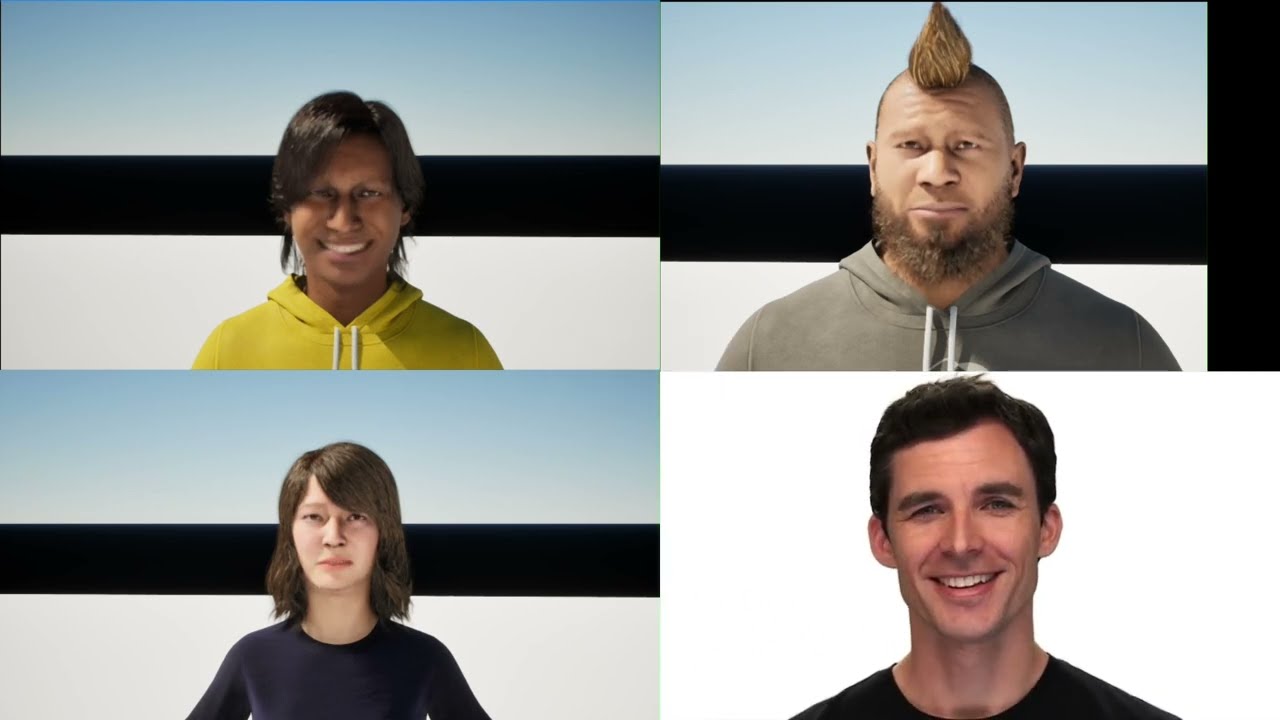
this was assignment 4 for the real-time animation module — three demos covering the full motion editing pipeline in unreal engine 5: mocap retargeting with character diversity, two-character ui-triggered interaction, and video-driven facial animation using metahuman animator.
demo 1: retargeting and character diversity
character selection
three metahumans were chosen to cover a broad range of body types:
- self-avatar — a normal-height, underweight male modelled after me
- small elderly female — a short, underweight older woman
- large overweight male — a tall, heavy-set character
creating metahumans via photogrammetry scanning was computationally infeasible on both lab machines and personal hardware. characters were downloaded from quixel bridge and customised inside the metahuman creator to match the intended body types.
retargeting workflow
the source motion-capture data was provided in vicon skeleton format. initial retargeting to the metahuman IK rig produced significant clavicle misalignment — the vicon clavicle bones were oriented in the opposite direction to the metahuman rig.
each clavicle was manually realigned in the IK retargeter by adjusting the bone chain rotational offsets until the shoulder silhouette matched the source performer. after this correction the full retarget pass was re-executed and animation sequences exported per character.
per-character motion editing
rather than applying identical motion to all three characters, per-character edits reflected differences in physique and personality:
| character | edit applied | rationale |
|---|---|---|
| self-avatar | default speed, minor posture fix | reduced forward lean introduced by the retarget |
| elderly female | reduced playback rate, shortened step length | reflects slower, more cautious gait |
| overweight male | default speed, increased physics asset body weight | simulates inertial impact of a heavier frame |
all three were placed side-by-side in a single level and animated simultaneously using sequencer for direct visual comparison.
limitation: the manual clavicle correction is applied globally to every frame. a per-frame or curve-driven correction would yield more accurate shoulder deformation during arm swing. the playback-rate and physics-weight modifications are also relatively coarse tools for conveying personality — a more rigorous approach would involve clip warping or blend-space-driven stride length adjustment keyed to a character-specific speed parameter.
demo 2: two-character interaction
interaction design
a dance-off scenario (dragonball-z and fly) was chosen as the two-character interaction. the user triggers one of three distinct dance animations via a UMG widget blueprint displayed on screen.
animation montage setup
each dance sequence was imported as an anim sequence asset and wrapped inside its own anim montage. the DefaultGroup.DefaultSlot slot was used throughout, matching the slot node in the body animation blueprint’s anim graph — inserted between the locomotion state machine output and the final output pose node.
blend-in and blend-out times of 0.25s were set on each montage for smooth entry and exit transitions rather than hard cuts.
blueprint logic
BeginPlay → create WBUIWidget → add to viewport → ShowMouseCursor = true

OnClicked (each button) →
  GetAllActorsOfClass →
  ForEachLoop →
  GetBodySkeletalMesh →
  GetAnimInstance →
  MontagePlay (corresponding montage)
each button fires its OnClicked event which calls MontagePlay on both characters simultaneously, blending out any currently active montage before starting the new one.
root motion challenge
the largest technical challenge was root motion handling. because the vicon captures encode the performer’s world-space trajectory into the root bone, playing an animation teleported each character to the capture origin rather than their current level position.
several mitigation strategies were explored:
- RootMotionRootLock = AnimFirstFrame — characters travelled forward but an initial snap on frame 0 remained
- SetActorLocation before PlayAnimation — marginal improvement but introduced a hard teleport of its own
- increasing montage blend-in time — partially masked the snap but delayed the onset of the intended motion
the snap was not fully eliminated. in hindsight, the cleanest solution would have been using in-place clips — breaking a rock-paper-scissors interaction into three separate in-place clips with an idle state between each, guaranteeing a neutral reset pose at every transition boundary. this approach was not pursued because the primary goal was to understand and resolve root motion directly rather than work around it. the iterative debugging process yielded a thorough understanding of how unreal handles root bone data, motion extraction, and the interaction between the animation blueprint and the character movement component.
demo 3: facial animation
dataset and clip selection
emotional facial video clips were sourced from the RAVDESS dataset (livingstone & russo, 2018). six emotion categories were selected to maximise expressive range: sad, happy, angry, sad-crying, rage, and a self-recorded face gymnastics sequence demonstrating extreme voluntary facial deformation.
metahuman animator workflow
processing was performed entirely within unreal engine using the metahuman animator plugin:
- a live link hub ingest server was started and configured to receive video input
- a metahuman performance asset was created for each source clip
- the video was processed through the animator pipeline — automatically estimating head pose, expression coefficients, and eye gaze from the monocular RGB feed
- resulting facial animation curves were exported as anim sequence assets and applied to both the self-avatar and a second metahuman of a different gender and age
- individual clips were concatenated inside a level sequence in sequencer to form a longer continuous emotional narrative
the process was notably straightforward — metahuman animator handled most of the heavy lifting automatically and performed robustly even with lower-quality source video.
cross-character transfer
the same performance assets were applied to a second metahuman with a heavier facial mesh. the heavier mesh produced visibly more expressive deformations, particularly in the cheek and jowl regions, due to the greater soft-tissue volume available for displacement.
what worked and what didn’t
worked well: macro expressions (open-mouth happiness, furrowed-brow anger) transferred convincingly. the self-recorded face gymnastics clip successfully tracked extreme deformations — wide jaw opening, puffed cheeks, exaggerated brow raises.
limitations: subtle emotions such as low-intensity sadness were less reliably reproduced — the animator’s expression coefficient estimator is optimised for clear, frontal, well-lit inputs. the most consistent artefact was in the eye region: gaze direction and eyelid animation showed noticeably less responsiveness than the lower face. this is a known limitation of monocular video-based performance capture, where occlusion and specular highlights on the sclera confound iris tracking. a depth camera or multi-view rig would improve eye fidelity.
concatenated clips also exhibit visible discontinuities at clip boundaries — cross-fading via sequencer’s blend tracks was applied but didn’t fully eliminate jumps due to large inter-clip pose differences.
what i learnt
- IK retargeter clavicle alignment is the most tedious part of any vicon-to-metahuman retarget — the bone orientation mismatch is not obvious until you see the T-pose with lopsided shoulders
- root motion in UE5 is powerful but fragile — encoding world-space trajectory in the root bone makes in-place interaction setups much harder than they need to be. decomposing interactions into in-place clips is the right architecture from the start
- metahuman animator is genuinely impressive for the effort it requires. consumer-grade video producing convincing macro expressions from a monocular RGB feed is remarkable
- blend-in/blend-out times on montages are not optional — without them, any UI-triggered animation switch looks immediately broken
- the eye region is always the hardest part of facial animation, whether you’re doing it by hand or driving it from video. gaze and eyelid fidelity matter disproportionately to perceived realism