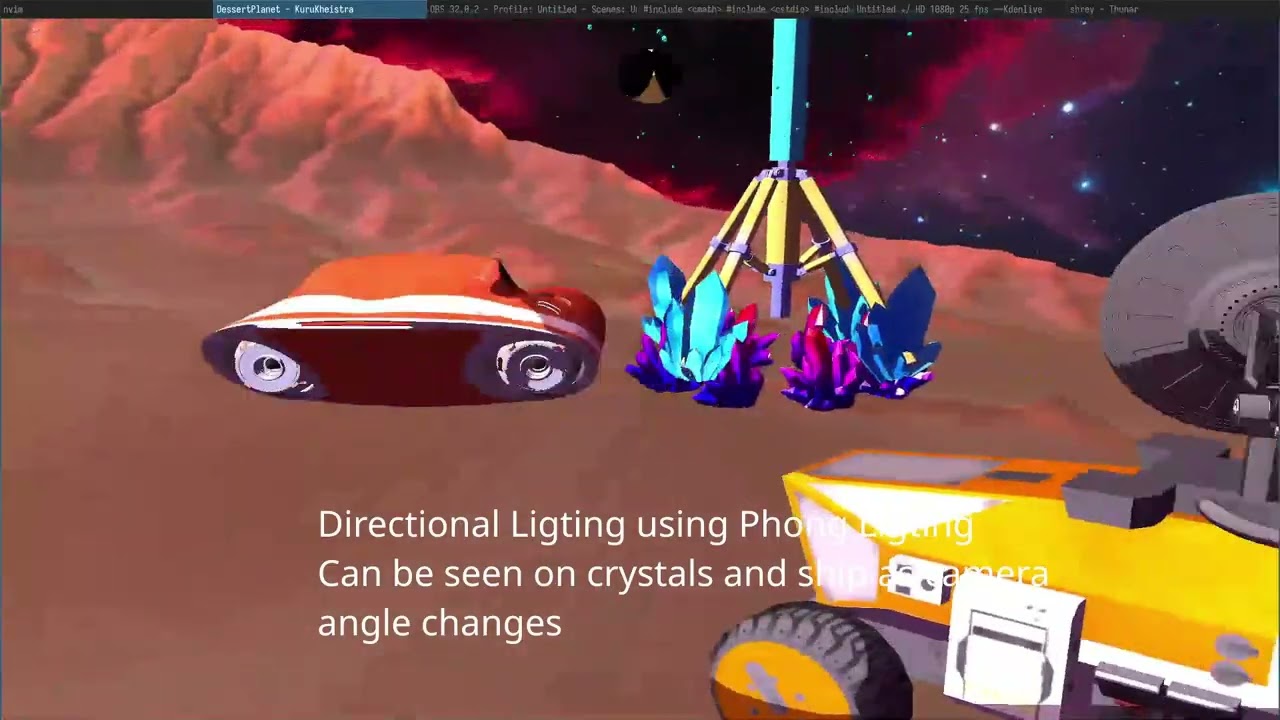
this was the final major deliverable for my real-time rendering module at trinity — build a complete, interactive 3d scene from scratch in opengl 3.3 core. i called it kurukheishtra: a martian desert planet with animated spacecraft, particle sand tornadoes, dynamic lighting, and post-processing infrastructure.
the scene
a martian terrain with:
- a spacecraft orbiting the scene, with alien orbs orbiting the spacecraft (three-level hierarchy)
- two gpu-accelerated sand tornadoes made of 30,000 particles each
- four lantern poles with point lights and procedurally placed crystal rings
- a directional sun light + image-based lighting from the nebula skybox
- a framebuffer post-processing pass (infrastructure in place for bloom, hdr, fxaa)
all running at 60 fps.
architecture
the codebase is split into focused header files — Lighting.hpp, Transforms.hpp, SceneObjects.hpp, sand_particles.hpp, FrameBuffer.hpp. no monolithic main.cpp.
gpu particle system
the tornadoes are 30,000 cpu-updated, gpu-rendered point sprites. each particle has position, velocity, and lifetime. the physics runs on cpu each frame:
// tornado widens as particles rise
float targetRadius = 0.02f + (p.pos.y / maxHeight) * 0.6f;
float pull = (targetRadius - dist) * 2.0f;
vel += normalize(p.pos.xz) * pull;
the entire particle buffer is streamed to the gpu with a single glBufferSubData call, then drawn with one draw call using GL_POINTS. gl_PointSize in the vertex shader fades size with lifetime:
gl_PointSize = mix(6.0, 2.0, 1.0 - life);
the fragment shader uses gl_PointCoord for circular discard and procedural perlin noise to vary density — no quad geometry needed, 75% vertex reduction vs billboard quads.
hierarchical animation
the spacecraft hierarchy works by composing transformation matrices:
// ship orbits world center at 30°/sec
glm::mat4 ship = revolve(localShip, 5.0f, radians(30.0f), t);
// orbs orbit the ship at 180°/sec
glm::mat4 orb  = revolveAroundParent(ship, localOrb, 2.0f, radians(180.0f), t);
revolveAroundParent extracts the parent world position from matrix[3] (the 4th column contains translation) and computes the child’s orbit relative to it. the result is coordinated layered motion — world → ship → orbs — with each level independent.
image-based lighting
instead of uniform ambient, surfaces sample the skybox texture based on their normals. the normal is converted to spherical UV coordinates and used to look up a blurred version of the skybox as an irradiance map:
irrUV.x = 0.5 + atan(N.z, N.x) / (2.0 * PI);
irrUV.y = 0.5 - asin(N.y) / PI;
vec3 irradiance = texture(irradianceMap, irrUV).rgb;
vec3 ambient = irradiance * albedo * 0.3;
surfaces facing the pink nebula region look pink-tinted; surfaces facing blue regions look blue-tinted. it’s a convincing approximation of global illumination at near-zero cost.
rendering pipeline order
order matters when mixing opaque geometry, particles, and a skybox:
- bind framebuffer
- skybox at depth 1.0 (
GL_LEQUAL) - opaque objects (depth write on)
- particles (depth write off, alpha blending on)
- post-process quad to screen
getting this wrong produces artifacts that are genuinely confusing until you understand why.
what i learnt
- gpu particles are surprisingly straightforward once you understand the buffer streaming pattern. the physics doesn’t need to be on the gpu to be fast — 30k particles on cpu is fine at 60hz
- hierarchy by matrix composition is elegant. the
matrix[3]trick for extracting parent position is one of those things that seems obvious in hindsight - ibl from a skybox texture is a huge visual upgrade for essentially free — blurring the skybox once and sampling it as an irradiance map is as cheap as any ambient term
- the framebuffer post-processing setup is boilerplate but the payoff (being able to add any screen-space effect without touching scene code) is worth it
- sorting transparent particles is genuinely hard at scale. low alpha + additive-friendly blending (
ONE_MINUS_SRC_ALPHA) is an acceptable cheat that looks fine in practice